> ## Documentation Index
> Fetch the complete documentation index at: https://docs.qrdyai.com/llms.txt
> Use this file to discover all available pages before exploring further.
# What is QrdyCraft? Turn Any Photo into a Mosaic Sticker Game
> QrdyCraft turns a photo or a keyword into a mosaic sticker-by-number that kids complete online or print and stick at home. You create it, your kids play it.
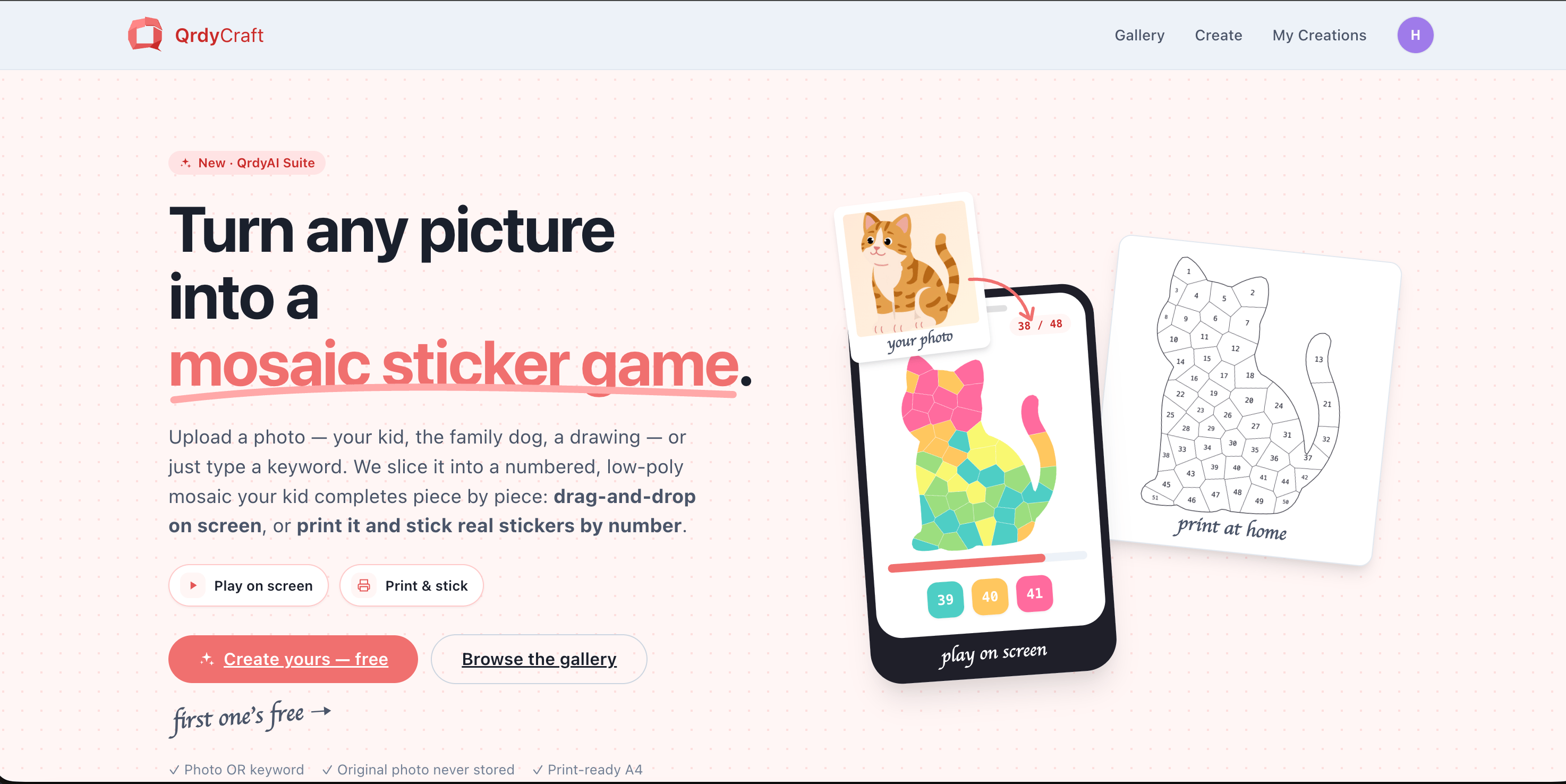
QrdyCraft turns any photo — or even just a keyword — into a **mosaic sticker-by-number** that a child can finish in two ways: play it on a screen by dragging numbered stickers into place, or print it and stick real decals by number at home. You set it up, your kids enjoy the result.
 ## How it works
Upload a picture (your kid, the family dog, a drawing) or just type a keyword like "rainbow butterfly".
In a few seconds, the image becomes a numbered, low-poly mosaic made of colored pieces.
Play online by dragging numbered stickers into place, or download a print-ready PDF.
Match each numbered sticker to its spot to reveal the finished, full-color picture.
## Two ways to play
Open it on a phone or tablet and drag numbered stickers into the grid — no app, no sign-in. Finish it to trigger confetti and reveal the full-color art.
Download a print-ready PDF, print the numbered grid at home, and stick real decals by number.
## Who it's for
QrdyCraft is **parent-operated and kid-played**: you (the parent) type the keyword, pick the difficulty, and download or share the result; your child (roughly ages 4–12) plays it. Difficulty scales with age:
| Difficulty | Pieces | Suggested age |
| ---------- | ------- | ------------- |
| Easy | 30–50 | 4–6 |
| Medium | 60–100 | 7–9 |
| Hard | 120–200 | 10–12 |
## Three output modes
Every mosaic comes in three views you can use however you like:
The finished full-color artwork.
The blank numbered outline to fill in.
The numbered, colored pieces to cut and place.
## Web and Canva
QrdyCraft runs on the web at [qrdyai.com/craft](https://qrdyai.com/craft) — the full experience with online play, print-ready PDFs, a gallery, and your saved creations. It also runs as a **Canva app**, where you create a mosaic and add it straight into your design as an image.
## Privacy
Uploaded photos are only traced for their outline and then discarded — the original image is not stored, and mosaics made from uploaded photos never appear in the public gallery. Only keyword-based creations can become public.
## Free and Pro
QrdyCraft is free to start — your first creation is on us. Free includes a few AI creations per month and print-ready PDFs (the numbered grid, sticker sheet, and color key your child uses are always watermark-free). Pro removes the limits.
Turn a photo or keyword into a mosaic sticker game in seconds.
## Frequently asked questions
No. Online play opens right in the browser — share a link or QR code and your child can start, no app or sign-in needed.
QrdyCraft is a family craft tool that a parent runs and a child plays with. The setup (keyword, difficulty, download) is meant for an adult; the finished game or printout is for the kids.
Yes. Upload a photo and QrdyCraft traces it into a mosaic. Your original image isn't stored, and photo-based mosaics stay private.
## How it works
Upload a picture (your kid, the family dog, a drawing) or just type a keyword like "rainbow butterfly".
In a few seconds, the image becomes a numbered, low-poly mosaic made of colored pieces.
Play online by dragging numbered stickers into place, or download a print-ready PDF.
Match each numbered sticker to its spot to reveal the finished, full-color picture.
## Two ways to play
Open it on a phone or tablet and drag numbered stickers into the grid — no app, no sign-in. Finish it to trigger confetti and reveal the full-color art.
Download a print-ready PDF, print the numbered grid at home, and stick real decals by number.
## Who it's for
QrdyCraft is **parent-operated and kid-played**: you (the parent) type the keyword, pick the difficulty, and download or share the result; your child (roughly ages 4–12) plays it. Difficulty scales with age:
| Difficulty | Pieces | Suggested age |
| ---------- | ------- | ------------- |
| Easy | 30–50 | 4–6 |
| Medium | 60–100 | 7–9 |
| Hard | 120–200 | 10–12 |
## Three output modes
Every mosaic comes in three views you can use however you like:
The finished full-color artwork.
The blank numbered outline to fill in.
The numbered, colored pieces to cut and place.
## Web and Canva
QrdyCraft runs on the web at [qrdyai.com/craft](https://qrdyai.com/craft) — the full experience with online play, print-ready PDFs, a gallery, and your saved creations. It also runs as a **Canva app**, where you create a mosaic and add it straight into your design as an image.
## Privacy
Uploaded photos are only traced for their outline and then discarded — the original image is not stored, and mosaics made from uploaded photos never appear in the public gallery. Only keyword-based creations can become public.
## Free and Pro
QrdyCraft is free to start — your first creation is on us. Free includes a few AI creations per month and print-ready PDFs (the numbered grid, sticker sheet, and color key your child uses are always watermark-free). Pro removes the limits.
Turn a photo or keyword into a mosaic sticker game in seconds.
## Frequently asked questions
No. Online play opens right in the browser — share a link or QR code and your child can start, no app or sign-in needed.
QrdyCraft is a family craft tool that a parent runs and a child plays with. The setup (keyword, difficulty, download) is meant for an adult; the finished game or printout is for the kids.
Yes. Upload a photo and QrdyCraft traces it into a mosaic. Your original image isn't stored, and photo-based mosaics stay private.