> ## Documentation Index
> Fetch the complete documentation index at: https://docs.qrdyai.com/llms.txt
> Use this file to discover all available pages before exploring further.
# How to Make and Play a Paint-by-Numbers Game Online (No Printing)
> Use QrdyCraft as a paint-by-numbers maker: turn a photo or keyword into a mosaic sticker-by-number game your kids play online — drag numbered stickers into place, no printing required.
Want a paint-by-numbers activity your kids can do right now, without a printer or a trip to the print shop? **QrdyCraft** turns any photo — or even just a keyword like "rainbow butterfly" — into a **mosaic sticker-by-number** your child can play entirely online: they drag numbered stickers into the matching cells until the picture appears. This guide covers the no-printing path from start to finish.
QrdyCraft is **parent-operated, kid-played**: you create the mosaic, then hand it off (a link or QR code) so your child, roughly ages 4–12, does the actual playing on a phone or tablet.
 ## Before you start
All you need is a free QrdyAI account (the first creation is free) and a device to play on. There's **no printing, no print shop, and no special materials** — the whole thing runs in the browser.
Prefer a physical craft? The same mosaic can be printed as peel-and-stick decals instead. See [How to Print Sticker-by-Number Decals at Home](/qrdy-craft/how-to-print-sticker-by-number-decals-at-home). This guide covers the **play-online** path.
## Step 1 — Make your paint-by-numbers mosaic
Go to [qrdyai.com/craft](https://qrdyai.com/craft) and click **Create yours — free**. If you're not signed in, QrdyCraft sends you to sign in and brings you back.
Type a keyword (like *rainbow butterfly*) for a gallery-friendly design, or switch to the **Upload photo** tab to use your own picture — your kid, the family dog, a drawing. Uploaded photos stay private and are never published to the public gallery.
Click **Generate**. In a few seconds you'll see the finished color mosaic. You can preview it as **Mosaic art**, **Numbered grid**, **Sticker sheet**, or **Color legend**.
Match the difficulty to your child's age, then choose a palette (Pastel, Vibrant, Ocean, Forest, Rainbow, Candy) and click **Re-tessellate** to rebuild the pieces on the same picture. For a first try, **Medium · Rainbow** keeps a 6-year-old busy for about 30 minutes.
| Difficulty | Sticker pieces | Suggested age |
| ---------- | -------------- | ------------- |
| Easy | 30–50 | 4–6 |
| Medium | 60–100 | 7–9 |
| Hard | 120–200 | 10–12 |
Turn any photo or keyword into a paint-by-numbers mosaic — free to start.
## Step 2 — Start playing online
Once your mosaic is ready, click **Play online**. You can also reach the play screen later from **My Creations** or from any design in the public **gallery**.
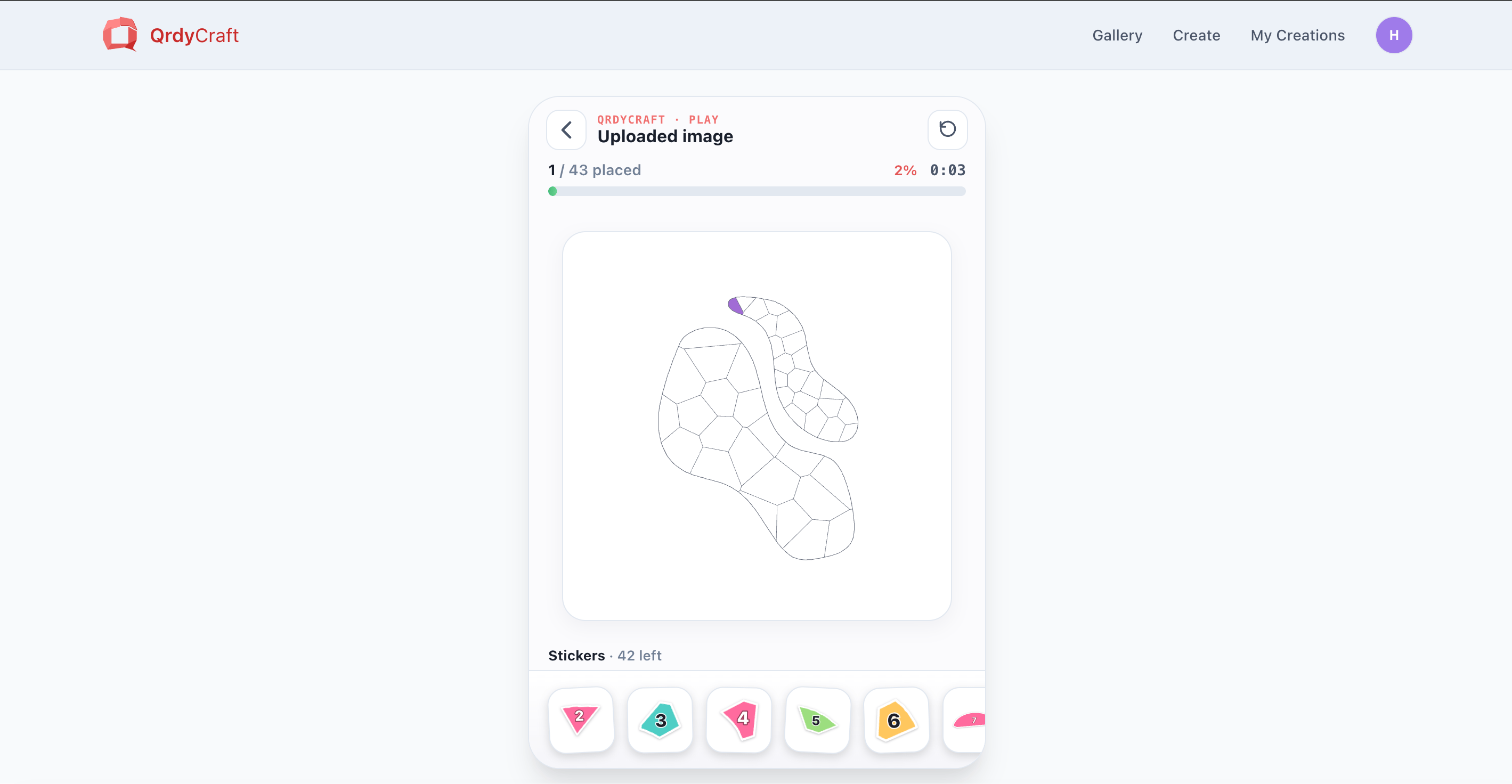
The play screen looks like a game board: a title, a **progress bar** (for example, "38 / 48"), the numbered mosaic grid, and a tray of round numbered stickers along the bottom.
Your child drags a sticker from the tray to the grid cell that shows the **same number**. Each correct placement bumps the progress bar up.
Pieces snap into their cells, so it's forgiving — a wrong number simply won't lock into the wrong spot.
When the last sticker is placed, the puzzle celebrates with **confetti** and reveals the full-color image.
Progress is saved on the device as you go (and on the server if you're the owner), so a half-finished mosaic is still there when your child comes back to it.
## Step 3 — Share it with your kids
Because the game is online, you don't have to hand over your own device. Public designs can be **shared by link or QR code** — send it to a tablet, or let a child scan the QR to open the game themselves.
Copy the play link and send it by message or email to any phone or tablet.
Let your child scan the QR code to open the mosaic and start playing right away.
Keyword-based designs are public and shareable by anyone with the link. Designs made from an **uploaded photo** are private and can only be opened by the owner while signed in.
## No design of your own? Play from the gallery
You don't have to create anything to try it. Open the public **gallery**, pick a mosaic, and click **Play online** to start immediately — a fast way to see how the game works before making your own.
## Free vs Pro for online play
Create 3 keyword mosaics and 1 photo upload per month, save up to 5 projects, and play any of them online. No card needed to start.
Unlimited AI creations and uploads, unlimited saved projects, priority processing, and early access to new game types. $9.99/month or $79/year.
## Doing it in Canva
QrdyCraft also runs as a **Canva app**, where you can generate a mosaic and add it to your design as a PNG. The **play-online game and PDF download are web features**, so for the interactive paint-by-numbers experience use the web app at [qrdyai.com/craft](https://qrdyai.com/craft).
## Frequently asked questions
No. The play-online path runs entirely in the browser — generate a mosaic, open **Play online**, and drag numbered stickers into place. Printing is only for the separate peel-and-stick decal path.
Yes. Upload a photo and QrdyCraft turns it into a numbered mosaic you can play online. Uploaded photos are traced for their outline, the original is discarded, and those designs never appear in the public gallery.
A phone or tablet works well for dragging stickers, but any browser is fine. Share the play link or QR code to open the game on your child's device.
Roughly 4–12. Match the difficulty to the child: Easy (30–50 pieces) for ages 4–6, Medium (60–100) for 7–9, and Hard (120–200) for 10–12.
## Before you start
All you need is a free QrdyAI account (the first creation is free) and a device to play on. There's **no printing, no print shop, and no special materials** — the whole thing runs in the browser.
Prefer a physical craft? The same mosaic can be printed as peel-and-stick decals instead. See [How to Print Sticker-by-Number Decals at Home](/qrdy-craft/how-to-print-sticker-by-number-decals-at-home). This guide covers the **play-online** path.
## Step 1 — Make your paint-by-numbers mosaic
Go to [qrdyai.com/craft](https://qrdyai.com/craft) and click **Create yours — free**. If you're not signed in, QrdyCraft sends you to sign in and brings you back.
Type a keyword (like *rainbow butterfly*) for a gallery-friendly design, or switch to the **Upload photo** tab to use your own picture — your kid, the family dog, a drawing. Uploaded photos stay private and are never published to the public gallery.
Click **Generate**. In a few seconds you'll see the finished color mosaic. You can preview it as **Mosaic art**, **Numbered grid**, **Sticker sheet**, or **Color legend**.
Match the difficulty to your child's age, then choose a palette (Pastel, Vibrant, Ocean, Forest, Rainbow, Candy) and click **Re-tessellate** to rebuild the pieces on the same picture. For a first try, **Medium · Rainbow** keeps a 6-year-old busy for about 30 minutes.
| Difficulty | Sticker pieces | Suggested age |
| ---------- | -------------- | ------------- |
| Easy | 30–50 | 4–6 |
| Medium | 60–100 | 7–9 |
| Hard | 120–200 | 10–12 |
Turn any photo or keyword into a paint-by-numbers mosaic — free to start.
## Step 2 — Start playing online
Once your mosaic is ready, click **Play online**. You can also reach the play screen later from **My Creations** or from any design in the public **gallery**.
The play screen looks like a game board: a title, a **progress bar** (for example, "38 / 48"), the numbered mosaic grid, and a tray of round numbered stickers along the bottom.
Your child drags a sticker from the tray to the grid cell that shows the **same number**. Each correct placement bumps the progress bar up.
Pieces snap into their cells, so it's forgiving — a wrong number simply won't lock into the wrong spot.
When the last sticker is placed, the puzzle celebrates with **confetti** and reveals the full-color image.
Progress is saved on the device as you go (and on the server if you're the owner), so a half-finished mosaic is still there when your child comes back to it.
## Step 3 — Share it with your kids
Because the game is online, you don't have to hand over your own device. Public designs can be **shared by link or QR code** — send it to a tablet, or let a child scan the QR to open the game themselves.
Copy the play link and send it by message or email to any phone or tablet.
Let your child scan the QR code to open the mosaic and start playing right away.
Keyword-based designs are public and shareable by anyone with the link. Designs made from an **uploaded photo** are private and can only be opened by the owner while signed in.
## No design of your own? Play from the gallery
You don't have to create anything to try it. Open the public **gallery**, pick a mosaic, and click **Play online** to start immediately — a fast way to see how the game works before making your own.
## Free vs Pro for online play
Create 3 keyword mosaics and 1 photo upload per month, save up to 5 projects, and play any of them online. No card needed to start.
Unlimited AI creations and uploads, unlimited saved projects, priority processing, and early access to new game types. $9.99/month or $79/year.
## Doing it in Canva
QrdyCraft also runs as a **Canva app**, where you can generate a mosaic and add it to your design as a PNG. The **play-online game and PDF download are web features**, so for the interactive paint-by-numbers experience use the web app at [qrdyai.com/craft](https://qrdyai.com/craft).
## Frequently asked questions
No. The play-online path runs entirely in the browser — generate a mosaic, open **Play online**, and drag numbered stickers into place. Printing is only for the separate peel-and-stick decal path.
Yes. Upload a photo and QrdyCraft turns it into a numbered mosaic you can play online. Uploaded photos are traced for their outline, the original is discarded, and those designs never appear in the public gallery.
A phone or tablet works well for dragging stickers, but any browser is fine. Share the play link or QR code to open the game on your child's device.
Roughly 4–12. Match the difficulty to the child: Easy (30–50 pieces) for ages 4–6, Medium (60–100) for 7–9, and Hard (120–200) for 10–12.