> ## Documentation Index
> Fetch the complete documentation index at: https://docs.qrdyai.com/llms.txt
> Use this file to discover all available pages before exploring further.
# How to Make Paint by Numbers from a Photo
> Turn any photo into a custom paint-by-numbers with QrdyCraft. This guide shows how the generator traces your picture into a numbered mosaic your kids play on screen or print at home.
Store-bought paint-by-numbers kits use stock pictures. With [QrdyCraft](/qrdy-craft/what-is-qrdycraft) you can turn *your own* photo — your kid, the family dog, a holiday snap — into a custom, number-guided craft in seconds. Technically QrdyCraft builds a **mosaic sticker-by-number** (a paint-by-numbers-style game where each numbered piece maps to a color), which your child can complete on screen or print and stick at home.
This guide walks through the generator step by step.
 ## Turn a photo into paint by numbers
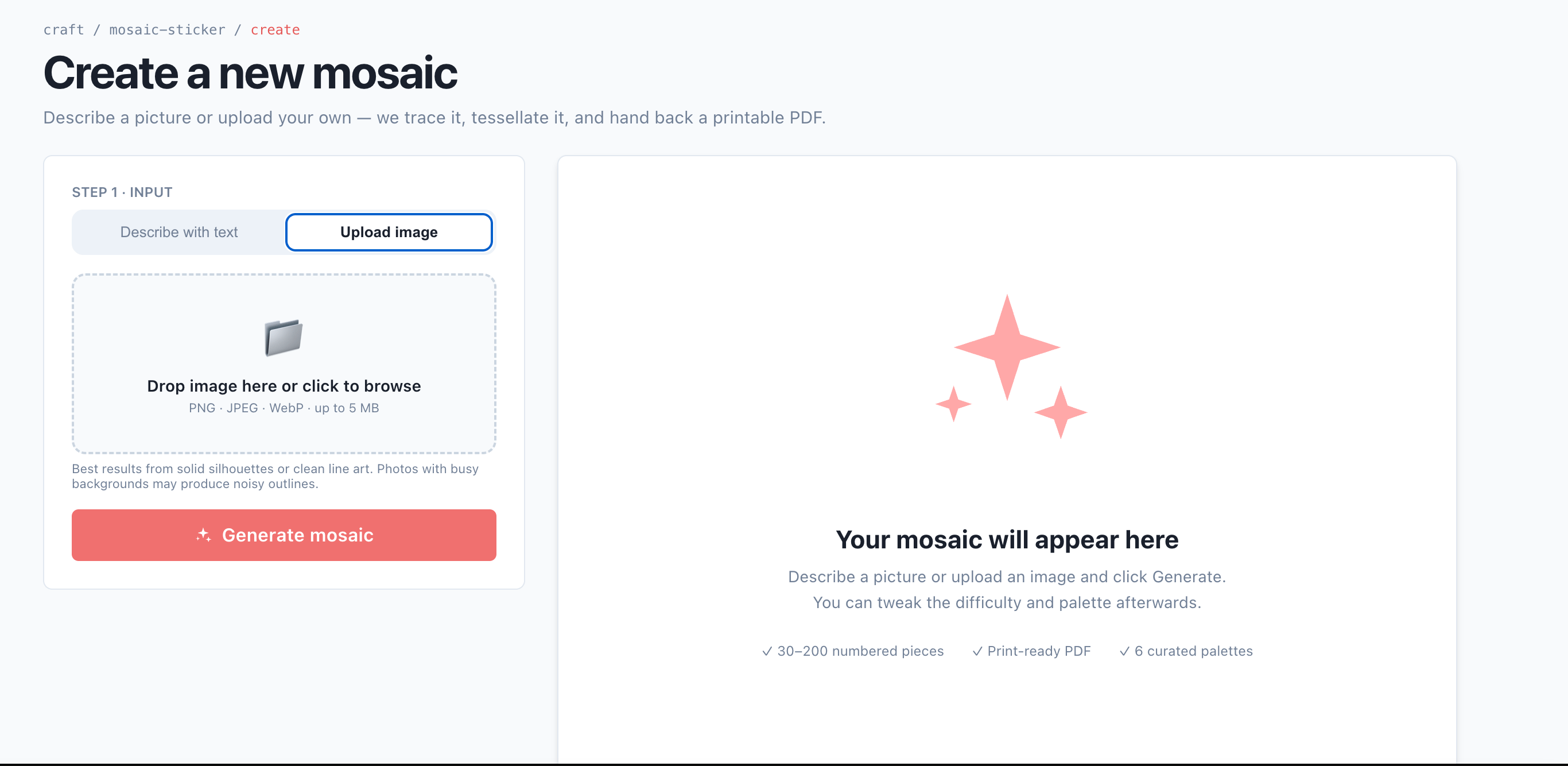
Go to [qrdyai.com/craft](https://qrdyai.com/craft) and open the create page. No app or sign-in is needed to start.
Upload a picture, or just type a keyword like "rainbow butterfly" if you don't have a photo ready. Simple images with a clear subject trace best.
Choose how many pieces the mosaic breaks into. More pieces means a harder, longer craft — match it to your child's age (see the table below).
In a few seconds, QrdyCraft's AI traces your image into a numbered, low-poly mosaic of colored pieces — the paint-by-numbers layout.
Play online by dragging numbered pieces into place, or download a print-ready PDF to complete by hand at home.
Turn a photo or keyword into a custom paint-by-numbers in seconds — your first creation is free.
## Match the difficulty to your child's age
The generator scales the number of pieces so the craft isn't too easy or too frustrating:
| Difficulty | Pieces | Suggested age |
| ---------- | ------- | ------------- |
| Easy | 30–50 | 4–6 |
| Medium | 60–100 | 7–9 |
| Hard | 120–200 | 10–12 |
## Three ways to use the result
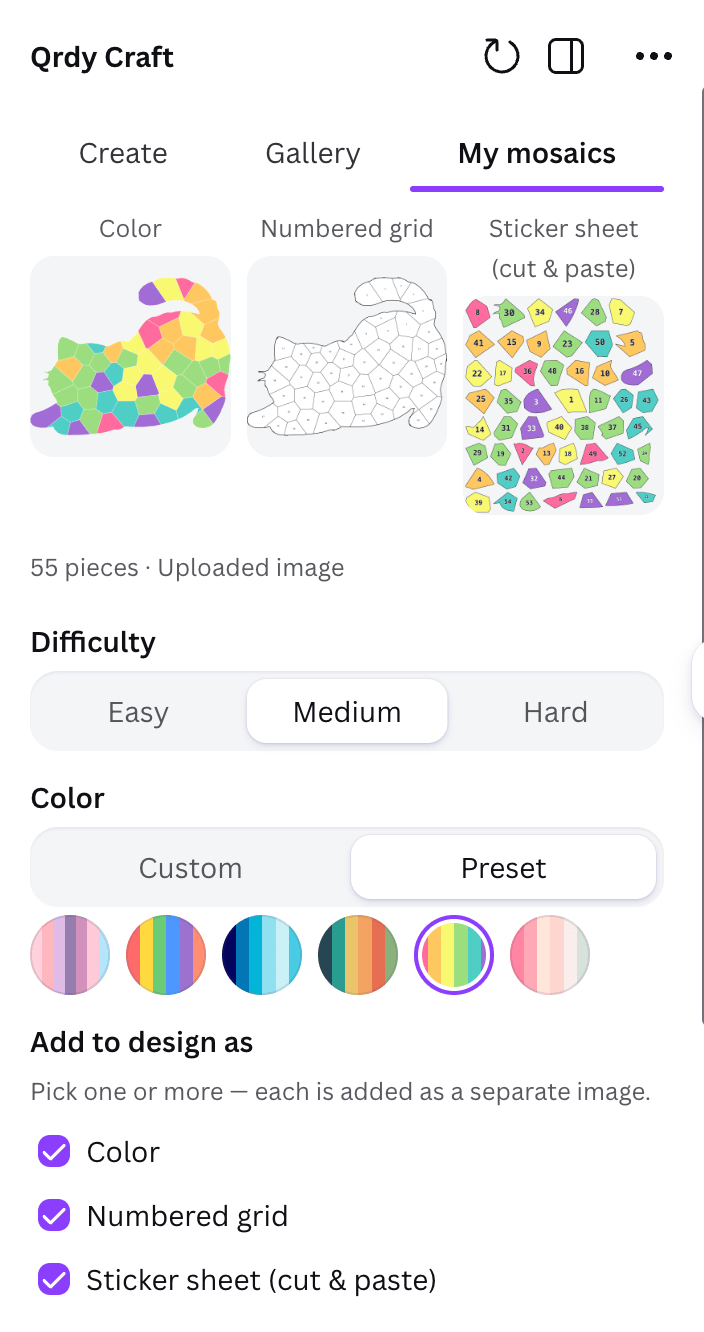
Every generated mosaic comes in three views, so you can play digitally, print, or both:
The finished full-color artwork — the picture your child is working toward.
The blank numbered outline to fill in, just like a classic paint-by-numbers sheet.
The numbered, colored pieces to cut and place by number.
## Turn a photo into paint by numbers
Go to [qrdyai.com/craft](https://qrdyai.com/craft) and open the create page. No app or sign-in is needed to start.
Upload a picture, or just type a keyword like "rainbow butterfly" if you don't have a photo ready. Simple images with a clear subject trace best.
Choose how many pieces the mosaic breaks into. More pieces means a harder, longer craft — match it to your child's age (see the table below).
In a few seconds, QrdyCraft's AI traces your image into a numbered, low-poly mosaic of colored pieces — the paint-by-numbers layout.
Play online by dragging numbered pieces into place, or download a print-ready PDF to complete by hand at home.
Turn a photo or keyword into a custom paint-by-numbers in seconds — your first creation is free.
## Match the difficulty to your child's age
The generator scales the number of pieces so the craft isn't too easy or too frustrating:
| Difficulty | Pieces | Suggested age |
| ---------- | ------- | ------------- |
| Easy | 30–50 | 4–6 |
| Medium | 60–100 | 7–9 |
| Hard | 120–200 | 10–12 |
## Three ways to use the result
Every generated mosaic comes in three views, so you can play digitally, print, or both:
The finished full-color artwork — the picture your child is working toward.
The blank numbered outline to fill in, just like a classic paint-by-numbers sheet.
The numbered, colored pieces to cut and place by number.
 ## Play on screen or print at home
Open it on a phone or tablet and drag numbered pieces into the grid — no app, no sign-in. Finishing it triggers confetti and reveals the full-color picture.
Download the print-ready PDF (grid, sticker sheet, and color key are watermark-free) and complete it with paint, markers, or real decals at home.
Photos with a single clear subject and good contrast trace into cleaner paint-by-numbers than busy group shots. If the first result looks noisy, try a simpler picture or a lower difficulty.
## A note on your photos
Uploaded photos are only traced for their outline and then discarded — your original image isn't stored, and paint-by-numbers made from uploaded photos never appear in the public gallery. Only keyword-based creations can become public.
## Frequently asked questions
Yes. Upload any photo and QrdyCraft's generator traces it into a numbered mosaic you can play on screen or print. Your original image isn't stored.
It's a paint-by-numbers-style craft: QrdyCraft builds a numbered mosaic (sticker-by-number) where each piece maps to a color. You can complete it digitally by dragging pieces, or print it and fill it in by hand.
No. Your first creation is free, and print-ready PDFs are watermark-free. Pro removes the monthly creation limits.
## Play on screen or print at home
Open it on a phone or tablet and drag numbered pieces into the grid — no app, no sign-in. Finishing it triggers confetti and reveals the full-color picture.
Download the print-ready PDF (grid, sticker sheet, and color key are watermark-free) and complete it with paint, markers, or real decals at home.
Photos with a single clear subject and good contrast trace into cleaner paint-by-numbers than busy group shots. If the first result looks noisy, try a simpler picture or a lower difficulty.
## A note on your photos
Uploaded photos are only traced for their outline and then discarded — your original image isn't stored, and paint-by-numbers made from uploaded photos never appear in the public gallery. Only keyword-based creations can become public.
## Frequently asked questions
Yes. Upload any photo and QrdyCraft's generator traces it into a numbered mosaic you can play on screen or print. Your original image isn't stored.
It's a paint-by-numbers-style craft: QrdyCraft builds a numbered mosaic (sticker-by-number) where each piece maps to a color. You can complete it digitally by dragging pieces, or print it and fill it in by hand.
No. Your first creation is free, and print-ready PDFs are watermark-free. Pro removes the monthly creation limits.