> ## Documentation Index
> Fetch the complete documentation index at: https://docs.qrdyai.com/llms.txt
> Use this file to discover all available pages before exploring further.
# Get Student Pack Code
> [Download the NoteMe app](https://qrdynamic.app/govip/5nio05), create a note with key 'student', and receive your Student Pack verification code. Stay updated on new releases and exclusive student offers.
## Quick steps
[Download the NoteMe app](https://qrdynamic.app/govip/5nio05) on your mobile device. Scan the QR code below for quick access, or use the direct links:
 **Direct download links:**
* **iOS**: [App Store](https://apps.apple.com/app/id6754964197)
* **Android**: [Google Play](https://play.google.com/store/apps/details?id=com.qrdy.atme)
The QR code automatically detects your device and redirects you to the correct app store!
Open the NoteMe app, log in (or create a free account), and create a new note with the key **"student"** in the content field.
**Direct download links:**
* **iOS**: [App Store](https://apps.apple.com/app/id6754964197)
* **Android**: [Google Play](https://play.google.com/store/apps/details?id=com.qrdy.atme)
The QR code automatically detects your device and redirects you to the correct app store!
Open the NoteMe app, log in (or create a free account), and create a new note with the key **"student"** in the content field.
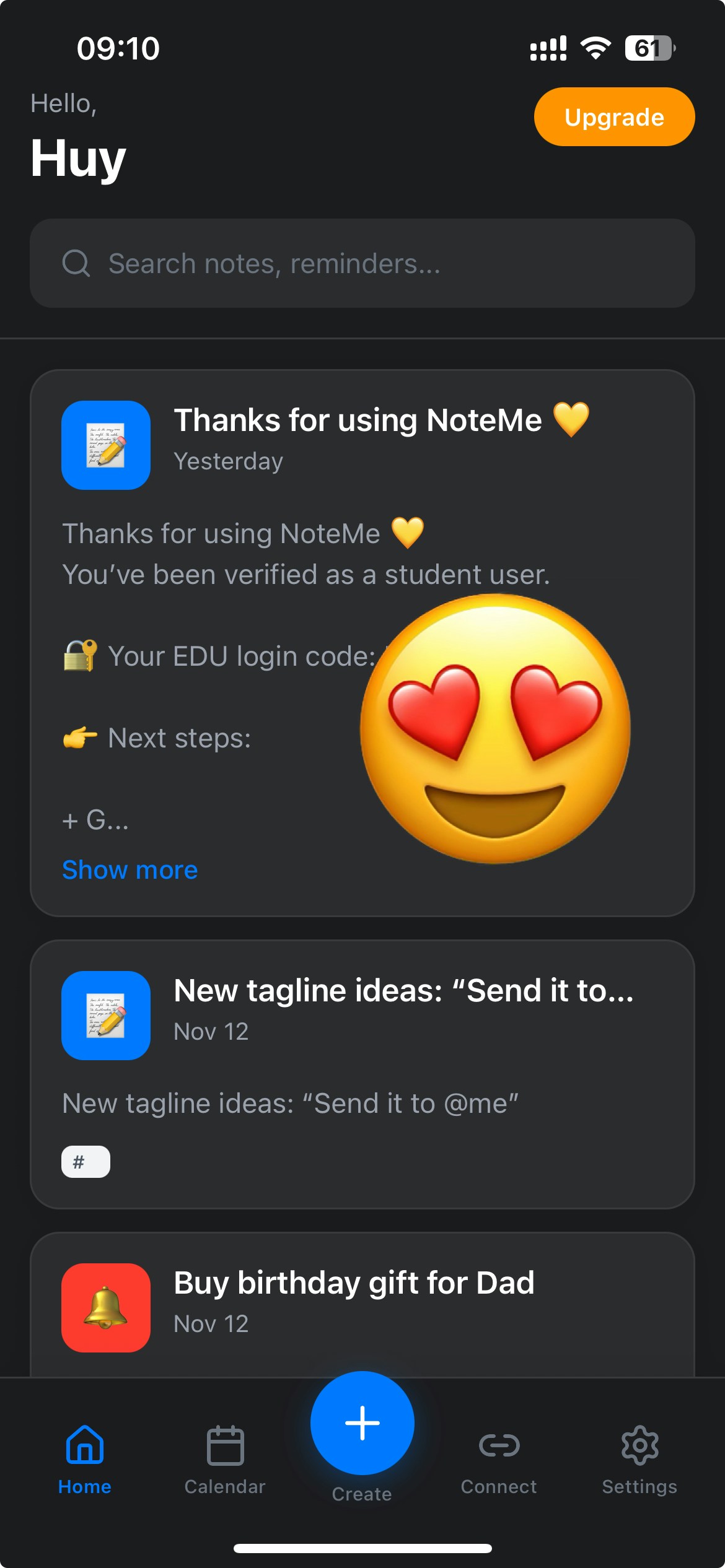
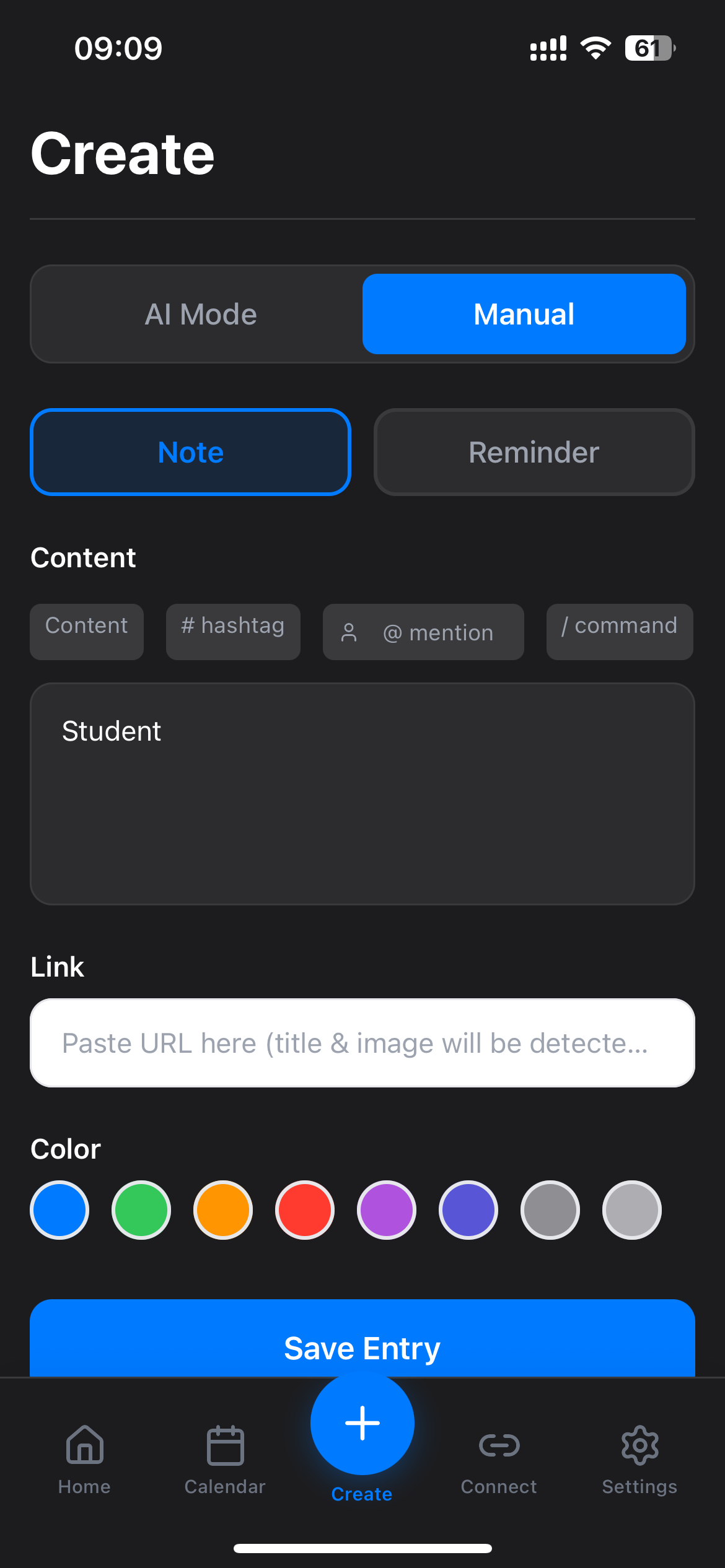 Note created? You'll receive your Student Pack code instantly!
After creating the note, you'll receive your Student Pack code. Return to the [Qrdy Student Pack page](https://qrdyai.com/studentpack) to complete your student verification.
Note created? You'll receive your Student Pack code instantly!
After creating the note, you'll receive your Student Pack code. Return to the [Qrdy Student Pack page](https://qrdyai.com/studentpack) to complete your student verification.
 ## Why this step?
Creating a note with "student" in NoteMe helps you:
* **Receive notifications**: Get notified about new student packages and updates
* **Stay informed**: Know when new packages launch and what's available
* **Exclusive codes**: Receive special promotional codes for student packages
* **Easy verification**: Streamline your student verification process
This step ensures you stay connected with the Qrdy Student program and never miss important updates or exclusive offers.
## Quick checklist
* [ ] NoteMe mobile app downloaded (iOS or Android)
* [ ] NoteMe account created and logged in
* [ ] Created a note with the key "student" in the content field
* [ ] Returned to [Qrdy Student Pack](https://qrdyai.com/studentpack) to complete verification
## Troubleshooting
Make sure you:
* Downloaded the **mobile app** (iOS or Android) - this doesn't work on the web version
* Created a note with the exact key **"student"** (lowercase) in the content field
* Logged in to your NoteMe account
Try refreshing the app or creating another note with "student" key if needed.
No, this step is only available on the mobile app (iOS or Android). You need to download the app from the App Store or Google Play.
No! This is available to all NoteMe users, including free users. You just need to download the mobile app and create a note with the key "student".
## About Qrdy Student Pack
The Qrdy Student Pack offers free 1-year Pro subscriptions for students and teachers. Eligible users can get access to premium features across Qrdy products.
Complete your student verification and get your free Pro subscription.
## Why this step?
Creating a note with "student" in NoteMe helps you:
* **Receive notifications**: Get notified about new student packages and updates
* **Stay informed**: Know when new packages launch and what's available
* **Exclusive codes**: Receive special promotional codes for student packages
* **Easy verification**: Streamline your student verification process
This step ensures you stay connected with the Qrdy Student program and never miss important updates or exclusive offers.
## Quick checklist
* [ ] NoteMe mobile app downloaded (iOS or Android)
* [ ] NoteMe account created and logged in
* [ ] Created a note with the key "student" in the content field
* [ ] Returned to [Qrdy Student Pack](https://qrdyai.com/studentpack) to complete verification
## Troubleshooting
Make sure you:
* Downloaded the **mobile app** (iOS or Android) - this doesn't work on the web version
* Created a note with the exact key **"student"** (lowercase) in the content field
* Logged in to your NoteMe account
Try refreshing the app or creating another note with "student" key if needed.
No, this step is only available on the mobile app (iOS or Android). You need to download the app from the App Store or Google Play.
No! This is available to all NoteMe users, including free users. You just need to download the mobile app and create a note with the key "student".
## About Qrdy Student Pack
The Qrdy Student Pack offers free 1-year Pro subscriptions for students and teachers. Eligible users can get access to premium features across Qrdy products.
Complete your student verification and get your free Pro subscription.